Skip to content

Matt Adam

Tech Blog

Menu
  • Home
  • Home Lab
    • Home Lab – Gen 1
    • Home Lab – Gen 2
    • Home Lab – Gen 3
  • VMware
    • VMware Cloud Foundation (VCF)
    • Avi Networks
  • Kubernetes
    • Openshift
    • K3s
    • Tanzu
      • Tanzu – TKGs (WCP)
      • Tanzu – TKG (TKGm)
    • Avi Kubernetes Operator (AKO)
  • About
  • Privacy Policy
Menu

Home Lab – Configure NTP on the ESXi Host

Posted on July 12, 2022 by Matt Adam

There’s lots of docs on this, but it’s worth adding this as a step, to rule out any future problems of NTP. You will do this for the physical ESXi hosts, and every nested esxi host that you create. Don’t skip this step. kb from vmware

Configure NTP

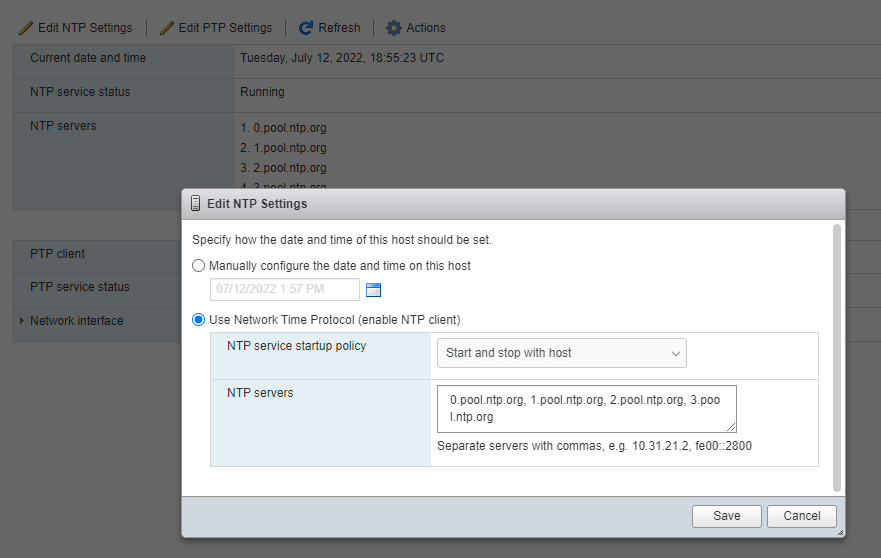
Login to the Web GUI of the esxi host. Navigate to Manage -> System -> Time & Date
Edit NTP Settings. Then manually set the NTP Servers, also “Start and stop with host”
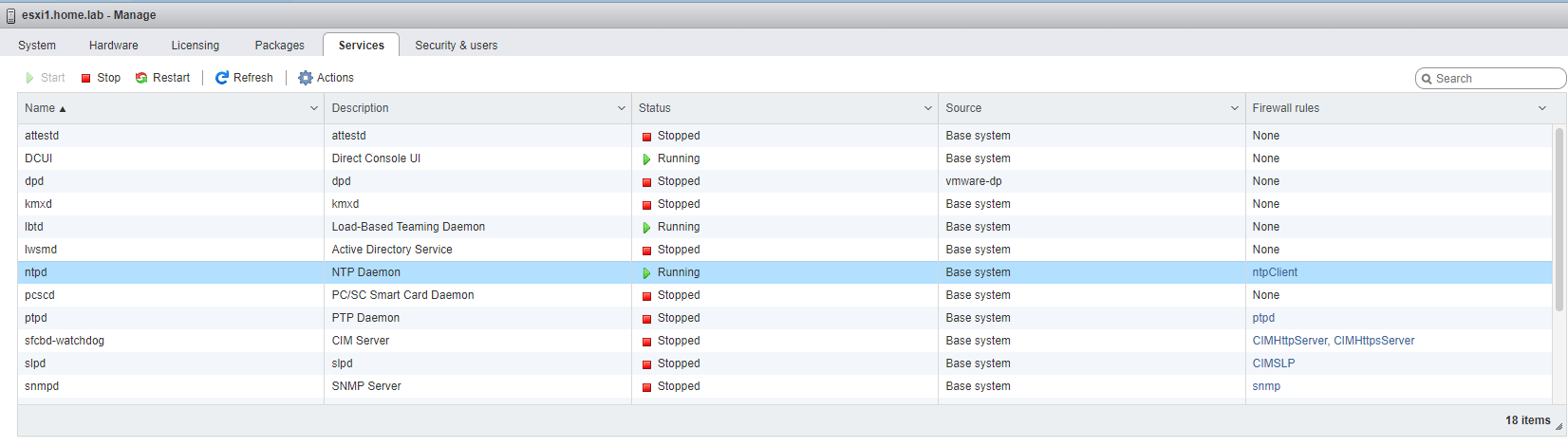
Finally, you can either manually enable the service or just reboot.
Back to the Host and enable SSH.
And Most importantly, Test NTP! I find it easiest via the cli since it removes any UI bugs.

Social Media

  • LinkedIn
  • X
  • Bluesky
  • Mastodon

Recent Posts

  • Financial Solutions for ETF share classes
  • Power Consumption Tips for Efficient Home Labs: Save Energy, Save Money
  • Automating Deployments with Terraform in a Home Lab: A Simple Guide for Tech Tinkerers
  • Backup Strategies for Home Lab Data: A Beginner’s Guide to Keeping Your Files Safe
  • Home Lab Monitoring with Grafana and Prometheus: How to Track Your Systems Like a Pro
© 2026 Matt Adam | Powered by Minimalist Blog WordPress Theme