VCF 5.2 was released for GA a few days ago. I wanted to make sure I provided an update post with some of the changes I’ve made for the lab, and the json manifest.
Software Versions used in this demo
| Software | Version |
|---|---|
| VMware Cloud Foundation | 5.2 |
| Physical vSphere Host | 8.0 Update 3 |
Update to Blog post
Please see the primary VCF deployment blog post. I explain all the steps on how to get VCF up and running in your home lab. This post is just to update on some of new pieces for 5.2.
What’s changed in the product?
You can see the official release notes here: VCF 5.2 Release Notes
What’s changed in my lab?
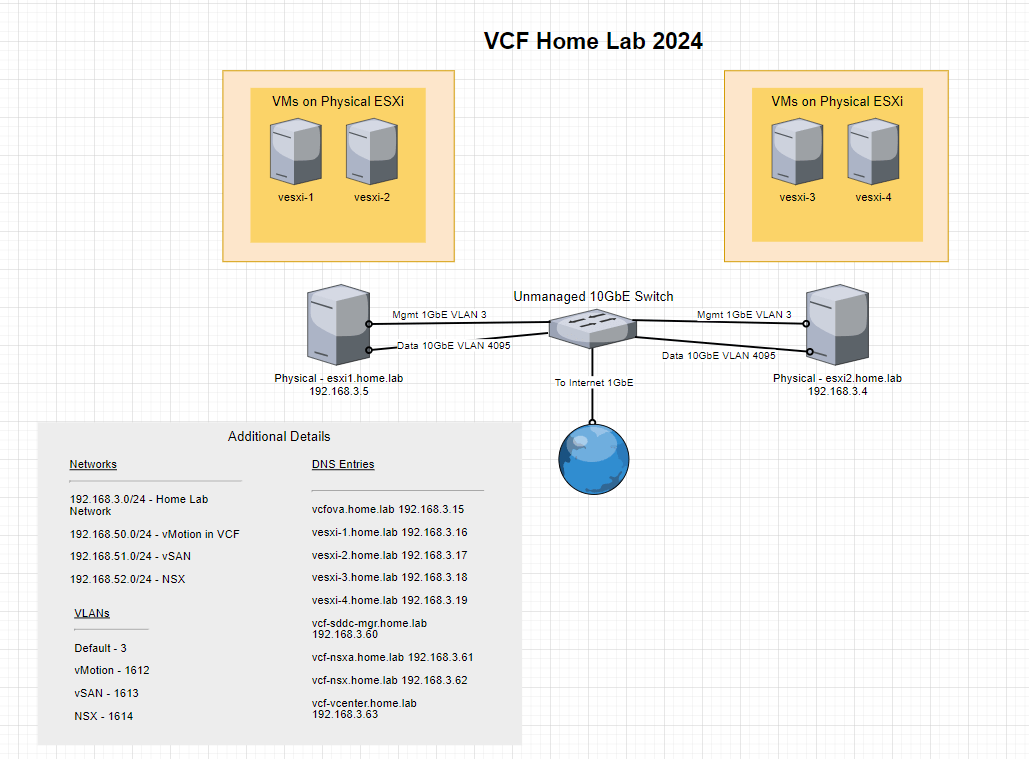
I purchased an unmanaged 10GbE switch (TP-Link TL-SX1008) so that I could move data between the virtualized hosts faster, and still give them internet connectivity. If you recall in a recent post, I was overwhelming the 1GbE links between each of the physical ESXI hosts, and it was causing things like vmotion to operate much slower than I liked. I added 10GB NICs to each of the SuperMicro hosts and put a cat 6 between them. That solved the vmotion problem, but since it was an isolated link, no internet access, and any pings to a gateway would fail. So I bit the bullet and just upgraded the switch.
Only other change was the licensing thing I discuss below. I’ll post the updated lab diagram here.
Updated json config for VCF Cloud Builder Tool
The main thing that has changed from below is the addition of the “deployWithoutLicenseKeys” parameter. I was running into some issues with the license serial keys I had, so it seems to fix the issue with applying that parameter. It will deploy VCF and all the components, but just put a temp license on them, you can always come back to the SDDC manager at a later time and add new licenses.
{
    "subscriptionLicensing": false,
  "skipEsxThumbprintValidation": true,
  "deployWithoutLicenseKeys": true,
  "managementPoolName": "vcf-mgmt-01",
  "sddcManagerSpec": {
    "secondUserCredentials": {
      "username": "vcf",
      "password": ""
    },
    "ipAddress": "192.168.3.60",
    "hostname": "vcf-sddc-mgr",
    "rootUserCredentials": {
      "username": "root",
      "password": ""
    },
    "localUserPassword": ""
  },
  "sddcId": "vcf-01",
  // "esxLicense": "",
  "taskName": "workflowconfig/workflowspec-ems.json",
  "ceipEnabled": false,
  "fipsEnabled": false,
  "ntpServers": ["pool.ntp.org"],
  "dnsSpec": {
    "subdomain": "home.lab",
    "domain": "home.lab",
    "nameserver": "192.168.3.6"
  },
  "networkSpecs": [
    {
      "networkType": "MANAGEMENT",
      "subnet": "192.168.3.0/24",
      "gateway": "192.168.3.1",
      "vlanId": "3",
      "mtu": "9000",
      "portGroupKey": "cl01-vds01-pg-mgmt",
      "standbyUplinks":[],
      "activeUplinks":[
        "uplink1",
        "uplink2"
      ]
    },
    {
      "networkType": "VMOTION",
      "subnet": "192.168.50.0/24",
      "gateway": "192.168.50.1",
      "vlanId": "1612",
      "mtu": "9000",
      "portGroupKey": "cl01-vds02-pg-vmotion",
      "includeIpAddressRanges": [{"endIpAddress": "192.168.50.104", "startIpAddress": "192.168.50.101"}],
      "standbyUplinks":[],
      "activeUplinks":[
        "uplink1",
        "uplink2"
      ]
    },
    {
      "networkType": "VSAN",
      "subnet": "192.168.51.0/24",
      "gateway": "192.168.51.1",
      "vlanId": "1613",
      "mtu": "9000",
      "portGroupKey": "cl01-vds02-pg-vsan",
      "includeIpAddressRanges": [{"endIpAddress": "192.168.51.104", "startIpAddress": "192.168.51.101"}],
      "standbyUplinks":[],
      "activeUplinks":[
        "uplink1",
        "uplink2"
      ]
    },
    {
      "networkType": "VM_MANAGEMENT",
      "subnet": "192.168.3.0/24",
      "gateway": "192.168.3.1",
      "vlanId": "3",
      "mtu": "9000",
      "portGroupKey": "cl01-vds01-pg-vm-mgmt",
      "standbyUplinks":[],
      "activeUplinks":[
        "uplink1",
        "uplink2"
      ]
    }
  ],
  "nsxtSpec":
  {
    "nsxtManagerSize": "small",
    "nsxtManagers": [
      {
          "hostname": "vcf-nsxa",
          "ip": "192.168.3.61"
      }
    ],
    "rootNsxtManagerPassword": "",
    "nsxtAdminPassword": "",
    "nsxtAuditPassword": "",
    "vip": "192.168.3.62",
    "vipFqdn": "vcf-nsx",
    // "nsxtLicense": "",
    "transportVlanId": 1614
  },
  "vsanSpec": {
      // "licenseFile": "",
      "vsanDedup": "true",
      "esaConfig": {
        "enabled": false
      },
      "datastoreName": "cl01-ds-vsan01"
  },
  "dvsSpecs": [
    {
      "dvsName": "cl01-vds01",
      "vmnics": [
        "vmnic0",
        "vmnic1"
      ],
      "mtu": 9000,
      "networks":[
        "MANAGEMENT",
        "VM_MANAGEMENT"
      ],
      "niocSpecs":[
        {
          "trafficType":"VSAN",
          "value":"HIGH"
        },
        {
          "trafficType":"VMOTION",
          "value":"LOW"
        },
        {
          "trafficType":"VDP",
          "value":"LOW"
        },
        {
          "trafficType":"VIRTUALMACHINE",
          "value":"HIGH"
        },
        {
          "trafficType":"MANAGEMENT",
          "value":"NORMAL"
        },
        {
          "trafficType":"NFS",
          "value":"LOW"
        },
        {
          "trafficType":"HBR",
          "value":"LOW"
        },
        {
          "trafficType":"FAULTTOLERANCE",
          "value":"LOW"
        },
        {
          "trafficType":"ISCSI",
          "value":"LOW"
        }
      ],
      "nsxtSwitchConfig": {
        "transportZones": [ {
          "name": "vcf-01-tz-overlay01",
          "transportType": "OVERLAY"
        },
        {
          "name": "vcf-01-tz-vlan01",
          "transportType": "VLAN"
        }
        ]
      }
    },
    {
      "dvsName": "cl01-vds02",
      "vmnics": [
        "vmnic2",
        "vmnic3"
      ],
      "mtu": 9000,
      "networks":[
        "VSAN",
        "VMOTION"
      ],
      "nsxtSwitchConfig": {
        "transportZones": [
        {
          "name": "vcf-01-tz-vlan02",
          "transportType": "VLAN"
        }
        ]
      }
    }
  ],
  "clusterSpec":
  {
    "clusterName": "cl01",
    "clusterEvcMode": "",
    "clusterImageEnabled": true,
    "vmFolders": {
      "MANAGEMENT": "vcf-01-fd-mgmt",
      "NETWORKING": "vcf-01-fd-nsx",
      "EDGENODES": "vcf-01-fd-edge"
    },
    "resourcePoolSpecs": [{
      "name": "cl01-rp-sddc-mgmt",
      "type": "management",
      "cpuReservationPercentage": 0,
      "cpuLimit": -1,
      "cpuReservationExpandable": true,
      "cpuSharesLevel": "normal",
      "cpuSharesValue": 0,
      "memoryReservationMb": 0,
      "memoryLimit": -1,
      "memoryReservationExpandable": true,
      "memorySharesLevel": "normal",
      "memorySharesValue": 0
    }, {
      "name": "cl01-rp-sddc-edge",
      "type": "network",
      "cpuReservationPercentage": 0,
      "cpuLimit": -1,
      "cpuReservationExpandable": true,
      "cpuSharesLevel": "normal",
      "cpuSharesValue": 0,
      "memoryReservationPercentage": 0,
      "memoryLimit": -1,
      "memoryReservationExpandable": true,
      "memorySharesLevel": "normal",
      "memorySharesValue": 0
    }, {
      "name": "cl01-rp-user-edge",
      "type": "compute",
      "cpuReservationPercentage": 0,
      "cpuLimit": -1,
      "cpuReservationExpandable": true,
      "cpuSharesLevel": "normal",
      "cpuSharesValue": 0,
      "memoryReservationPercentage": 0,
      "memoryLimit": -1,
      "memoryReservationExpandable": true,
      "memorySharesLevel": "normal",
      "memorySharesValue": 0
    }, {
      "name": "cl01-rp-user-vm",
      "type": "compute",
      "cpuReservationPercentage": 0,
      "cpuLimit": -1,
      "cpuReservationExpandable": true,
      "cpuSharesLevel": "normal",
      "cpuSharesValue": 0,
      "memoryReservationPercentage": 0,
      "memoryLimit": -1,
      "memoryReservationExpandable": true,
      "memorySharesLevel": "normal",
      "memorySharesValue": 0
    }]
  },
  "pscSpecs": [
    {
      "adminUserSsoPassword": "",
      "pscSsoSpec": {
        "ssoDomain": "vsphere.local"
      }
    }
  ],
  "vcenterSpec": {
      "vcenterIp": "192.168.3.63",
      "vcenterHostname": "vcf-vcenter",
      // "licenseFile": "",
      "vmSize": "small",
      "storageSize": "",
      "rootVcenterPassword": ""
  },
  "hostSpecs": [
    {
      "association": "dc01",
      "sshThumbprint": null,
      "sslThumbprint": null,
      "ipAddressPrivate": {
        "ipAddress": "192.168.3.16"
      },
      "hostname": "vesxi-1",
      "credentials": {
        "username": "root",
        "password": ""
      },
      "vSwitch": "vSwitch0"
    },
    {
      "association": "dc01",
      "sshThumbprint": null,
      "sslThumbprint": null,
      "ipAddressPrivate": {
        "ipAddress": "192.168.3.17"
      },
      "hostname": "vesxi-2",
      "credentials": {
        "username": "root",
        "password": ""
      },
      "vSwitch": "vSwitch0"
    },
    {
      "association": "dc01",
      "sshThumbprint": null,
      "sslThumbprint": null,
      "ipAddressPrivate": {
        "ipAddress": "192.168.3.18"
      },
      "hostname": "vesxi-3",
      "credentials": {
        "username": "root",
        "password": ""
      },
      "vSwitch": "vSwitch0"
    },
    {
      "association": "dc01",
      "sshThumbprint": null,
      "sslThumbprint": null,
      "ipAddressPrivate": {
        "ipAddress": "192.168.3.19"
      },
      "hostname": "vesxi-4",
      "credentials": {
        "username": "root",
        "password": ""
      },
      "vSwitch": "vSwitch0"
    }
  ]
}