
Have you ever gotten bogged down by all that you need to manage in your home lab? Server installs, software installs, and keeping both of them up to date—before you know it, it gets out of hand. That is where tools like Ansible come in and rescue the situation. If you are new or wish to smarten up your setup, you are in the right place with this tutorial.
Let’s simplify it in the most basic terms, so you can start using this incredible tool with ease.
What is Ansible and Why Should You Care
Before we get into the nitty-gritty, let’s start with the basics. This is an open-source automation tool that helps you manage your machines without having to log in to each one of them individually. It’s like a responsible assistant who does things for you to get your work done like installing software, updating computers, and setting up settings—without you ever having to lift a finger after it’s installed.
In your own home technology setup, this makes life a great deal easier. Instead of repeating the same operations time and time again on each machine, you do them once, and this utility runs them for you on all your PCs.
Then why not make your lab smarter and headache-free?
Setting Up the Basics
All set? Good news: it’s easy to install.
First, install the tool on your master machine (usually referred to as the control node). In case you’re using a Linux environment such as Ubuntu, you can install the tool as easily as:
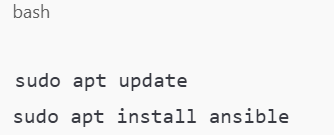
After you’ve done that, you will generate an inventory file. It’s kind of like a phonebook for your home lab servers. You’ll include your server’s IP addresses or hostnames in it so the system will be aware of where to find them.
For example:
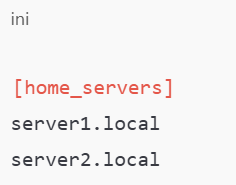
You can now connect and control them all at once. Cool, right?
Your First Task: Making Things Happen
Suppose you have several machines that you need to update. You would normally need to log into each one and issue update commands. With your new environment, you simply create a little file (a playbook) that instructs the system.
Here’s a really simple playbook:
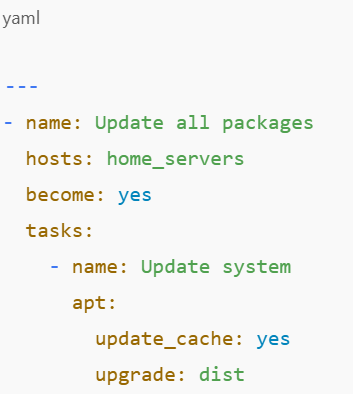
Then you run:
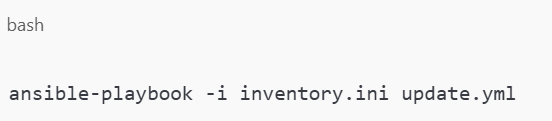
And just like that, all your servers are updated.
Doing More with Less Effort
Now that you’ve experienced the magic, you’ll likely want to do more. Consider all the repetitive things you do in your home lab: installing Docker, configuring web servers, working with user accounts, or setting up your firewall.
This utility gives you an easy way of handling all that in a few lines of code. Even better—you can recycle the same commands every time you restore or reconstruct your lab.
Suppose you clean a server to begin again. Rather than taking an hour to set it up, you execute a playbook—and voila, it’s up in minutes.
This isn’t about being lazy (which is fine too). It’s about being smart with your time.
Organize Like a Pro
As your playbooks increase, you will want to keep them in order. That is where roles come in. Roles are like folders for your playbooks. Roles allow you to bundle tasks together into reusable sets.
For instance, you can define the role of installing and configuring Docker. Then, utilize the same role in any other playbooks as and when needed.
Here’s what you’d place in a role:
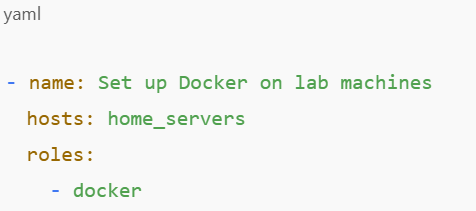
Clean, tidy, and a pleasure to work with. And the best of all? Thousands of available jobs from the web community are at your fingertips if you don’t feel like creating one entirely from scratch.
Real-Life Applications in Your Environment
Still not clear how this relates to your everyday setup? Let’s discuss real examples:
1. Spinning Up a Media Server
Did you have to install something like Plex or Jellyfin? Make a playbook that installs the media software, creates the folders, and sets the permissions. You can use the same setup over and over again on any new computer.
2. Securing Your Devices
Automate the process to enable the firewalls, rotate the SSH keys, and update the passwords on a regular basis. It’s much safer than doing it by hand—and much less likely to be forgotten.
3. Keeping Everything Updated
Instead of having to log in to 5 or 10 machines and update them, write a playbook and run it whenever you need to. Or run a job to do it on a schedule.
4. Learning More about DevOps
This is a handy skill in the real world—it’s an excellent learning skill as well. If you’re looking to work in IT, sysadmining, or DevOps, this is a skill you should know. If you practice your skills in your home lab, you gain experience that becomes an open door in the future.
Let’s Recap: What’s in It for You
Up to now, we have discussed how this automation tool assists you:
- Automate menial tasks in order to save time.
- Steer clear of errors that arise from doing things by hand.
- Maintain your equipment consistently and make it simple to operate.
- Gain hands-on technical knowledge in the process.
And most of all, it makes your home lab fun to go into and mess around with, without having to be saddled with drudgery.
Ready to Take Charge?
Now that you’ve seen what this tool can do for your environment, what are you going to automate first? Whether it is keeping your systems current, rolling out new services, or simply messing around for kicks, this is your ticket to doing things like a pro.
Have a try. Create a simple playbook. Watch your machines obey your every command. You will wonder how you ever did without it. And remember, you don’t need to be a genius to begin—you just need to begin.
Want more tips like that? Read on our blog at MattAdam.com, where we demystify home lobbying and make it intelligent and highly rewarding.