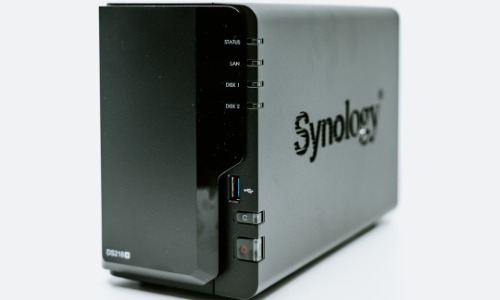
Have you ever asked yourself where these technical gurus or home-based businessmen safely keep all their documents at home? How one stores data, whether for home videos, business presentations, or high-capacity backup data and files, has become a necessity. That is where NAS or Network-Attached Storage comes into the picture. So, the question arises: How does one choose the right setup?
In this article, I will explain in easy language the best NAS solutions for home Labs in 2025 and the reasons why these devices are even more important today.
Why Should You Even Care About NAS?
Everyone who works in a home lab has a variety of hard drives, USB sticks, and cloud subscriptions that are often scattered and hard to organize. NAS is, in essence, like the computer cloud at your home, so to speak. It is one or more devices that are typically plugged into your network for storing, safeguarding, and distributing files across your devices. Of course, no technology has changed the game more than a good NAS if you are getting your first tech project; you are just basically storing family memories or constructing a home server.
Thus, what defines a good system for personal labs for this year? Let’s explore.
What to Look For in a 2025 NAS Setup
However, to know what these are, it is important to understand what to consider when searching for a good one:
Storage Size: Think long term. If you tend to store high-res videos or if you have to run Virtual Machines, the quantity shines through.
Speed and Performance: Processor speed and amount of RAM is useful when you plan to use NAS for various work loads.
Expandable Bays: Planning to add some more drives at a later point in time? Select a setup that suits the present needs and with an eye on the future.
Usability: Not all people can handle technology or computers well enough to seek it. A good NAS should also be easily set up and managed without requiring much professional help.
Now, to proceed to the most popular NAS solutions for home lab this year and why each of them can be suitable for your configuration.
1. Synology DiskStation DS1522+
This is a good and stable app that has a special appeal to the technical crowd. It comes with five drive bays as you would expect indicating it has the capacity to hold a large amount of data and they are also expandable. Besides, the operating system on which it is based is uniquely intuitive; it is called Synology DiskStation Manager.
It also has functions for backing up a computer, sharing files, and even running small websites or applications. For an individual who is running a home network and is likely to carry out a number of tasks, this NAS is quite ideal.
2. QNAP TS-464
All in all, this four-bay NAS is splendid due to a fantastic combination of price and performance. It makes use of an Intel Celeron processor and it has expandable memory storage system. It is perfect if you are looking for something that is good for a current flight but will not seem obsolete in some couple of years.
That way it can also be used for the storing of Movies and Music downloads, security camera records or running your own personal cloud. It is a slim device with clear app and design so it easily becomes a part of any size of the room.
3. TerraMaster F4-423
For the users, who are in search of a powerful NAS for not too high a price, TerraMaster’s four-bay model will be the right choice. It also has an Intel quad-core processor with a fast processing rate with the ability to stream 4k HD videos. If you are a maniac, creating any type of movies or just a film collectible, this one is definitely for you to consider.
And despite its name, the brand is not very famous but widespread due to its line of creating affordable yet effective storage devices.
4. Asustor Lockerstor 4 Gen2 (AS6704T)
Are you need something that is capable to sustain the future technology? This unit means business; so, it is endowed with power. It has two 2.5 GbE ports and this implies that you get better, improved network connection from the start. It also has SSD caching for the purpose of optimal performance as well as quicker access to frequently used files.
All in all, if you really want to have an effective and secure home network, this one provides a lot of settings ideal for business networks.
Which One Is Right for You?
As a notion, it can be challenging to select the best NAS solutions from the above-listed options depending on one’s needs for a home lab. Don’t you think that it is just images of your family? Go simple. While the last step can be achieved via other ways, the two mentioned practices are generally related to experiments with virtual machines and databases. Choose one that has more random access memory and central processing unit speed.
Sometimes you may need to consider such features as power consumption, noise level of the fans, or convenience of using a mobile application. Yet there is no single universally perfect setup for every user; the configuration must match one’s living conditions, financial capabilities and prospects for the future.
How Do You Set One Up?
Once you finally have settled on your preferred one, most of the time you just have to install it. Just about all the systems of the current generation suggest the steps. You will insert your external storage devices, link it to your home connection and access it through the web interface. From there it’s relative to create folders, set up user accounts, as well as turn on the backups.
Well, yes, and quite predictably, most devices also allow a user to have his files on the go. Therefore, there is no chance to lose your data even if you are in a different city or even country.
Final Thoughts: Is It Worth the Investment?
Absolutely. As more activities happen on the computer and over the internet, having a dependable system that can store your files at home makes sense. For both students as well as content creators or people who want to take control of an aspect of their digital lives, these NAS solutions for a home lab provide unique versatility, raw power, and the ability to sleep well at night.
Based on the current development patterns, it is only a matter of time before such systems become even more sophisticated, cheaper, and user-friendly as we advance further into the year 2025. Thus, if you have been pondering the idea of establishing a home network for storage and use, this should be a great opportunity to go for it.