Skip to content

Matt Adam

Tech Blog

Menu
  • Home
  • Home Lab
    • Home Lab – Gen 1
    • Home Lab – Gen 2
    • Home Lab – Gen 3
  • VMware
    • VMware Cloud Foundation (VCF)
    • Avi Networks
  • Kubernetes
    • Openshift
    • K3s
    • Tanzu
      • Tanzu – TKGs (WCP)
      • Tanzu – TKG (TKGm)
    • Avi Kubernetes Operator (AKO)
  • About
  • Privacy Policy
Menu

Home Lab – Configuring Nested ESXi7 on SuperMicro UPDATED

Posted on July 12, 2022 by Matt Adam

So with the first lab I ran into some DHCP issues, since I wasn’t separating anything with vlans, nor was I separating the traffic via switches. With this new lab, I’ve simplified it even further. I’m not using any routing and switching, outside of NSX-T.

So for configuring the Nested ESXis, you can still follow this guide. The guide will show the process of deploying nested ovas onto your physical ESXi. As far the vm settings, network configurations, please see below.

Table of Contents

Toggle
  • Physical ESXi Network Settings
  • Nested ESXi VM configuration

Physical ESXi Network Settings

Default settings here. Every VM is set to use the VM Network port group. My lab network is using vlan 3, fyi. If you are not using a vlan, then disregard that.
Default, no additional switches here.
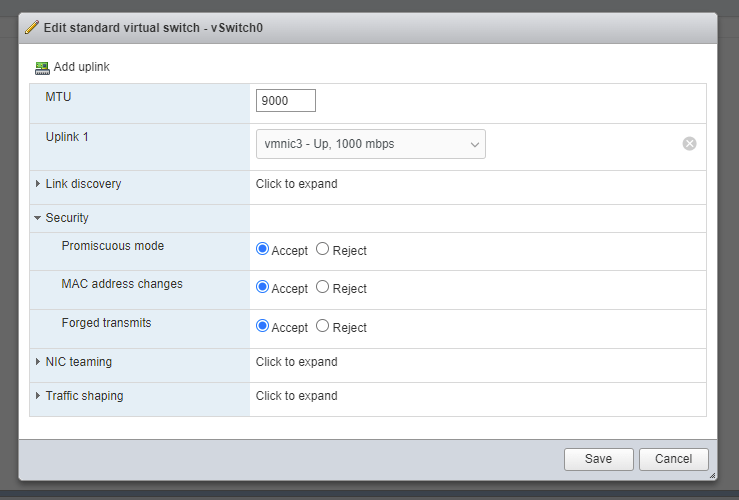
on the vSwitch0, set the MTU to 9000 and under Security, change everything to Accept. It doesn’t matter which uplink you see in there, fyi.
No changes here. I have 4 ethernet cables plugged in, and I’m only really using 1.
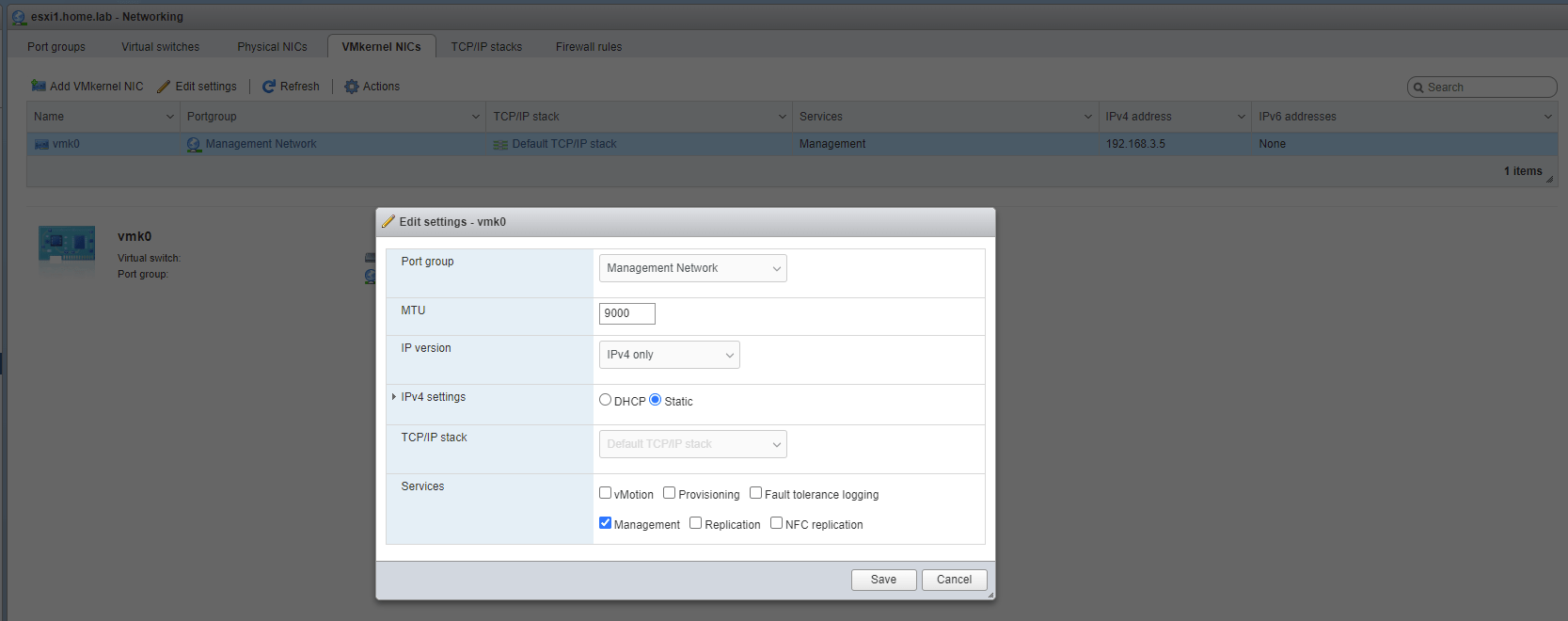
On the vmk0 VMKernel NIC, set the MTU to 9000. Don’t modify anything else, or you might lose network connectivity.

Nested ESXi VM configuration

Follow the doc above on how to configure these vms.

Here’s an updated picture of how I have it configured in the new lab.

Nested esxi Specs:

  • 8 cpu each (Make sure to check “Expose hardware assisted virtualization to the guest OS”)
  • 64 GB memory
  • 3 Hard Disks
    • 8GB for ESXi installation (Thin provisioned)
    • 4GB for vSAN caching (Thin provisioned)
    • 500GB for vSAN capacity (Thin provisioned)
  • 3 Network Adapters: All VM Network

Social Media

  • LinkedIn
  • X
  • Bluesky
  • Mastodon

Recent Posts

  • Financial Solutions for ETF share classes
  • Power Consumption Tips for Efficient Home Labs: Save Energy, Save Money
  • Automating Deployments with Terraform in a Home Lab: A Simple Guide for Tech Tinkerers
  • Backup Strategies for Home Lab Data: A Beginner’s Guide to Keeping Your Files Safe
  • Home Lab Monitoring with Grafana and Prometheus: How to Track Your Systems Like a Pro
© 2026 Matt Adam | Powered by Minimalist Blog WordPress Theme